Your scenes are already there
Nothing to retype: every scene becomes a strip with its number, INT/EXT, day or night, heading, first line of action, cast and page eighths.
SHOOTING SCHEDULE SOFTWARE
Every scene in your script becomes a strip with its color, its page eighths and its cast. Drag strips into shooting days and Scriptico adds up pages and time; when the script changes, the new scene shows up in “Unassigned” by itself.
WHAT IT SOLVES
Nothing to retype: every scene becomes a strip with its number, INT/EXT, day or night, heading, first line of action, cast and page eighths.
Move strips between days and “Unassigned”. Each day shows its date, scenes, pages and estimated time; each strip keeps its location, minutes and shooting notes.
Add a scene and it appears in “Unassigned”; delete one and it leaves the schedule. No outdated copy of the schedule floating around.
Interior day, exterior day, interior night, exterior night, and dawn or dusk, each with its own strip color, like a production board.
One row per actor and one column per day, with SW, W, WF, SWF and H codes, work and hold days. Print it or export it to CSV.
From each day you download the sides with the scenes in shooting order and open that day's call sheet, built from what you've already entered.
WHAT IT LOOKS LIKE
Every shooting day with its date and totals; every strip with its location, cast and shots. Open a strip to add estimated time and shooting notes.
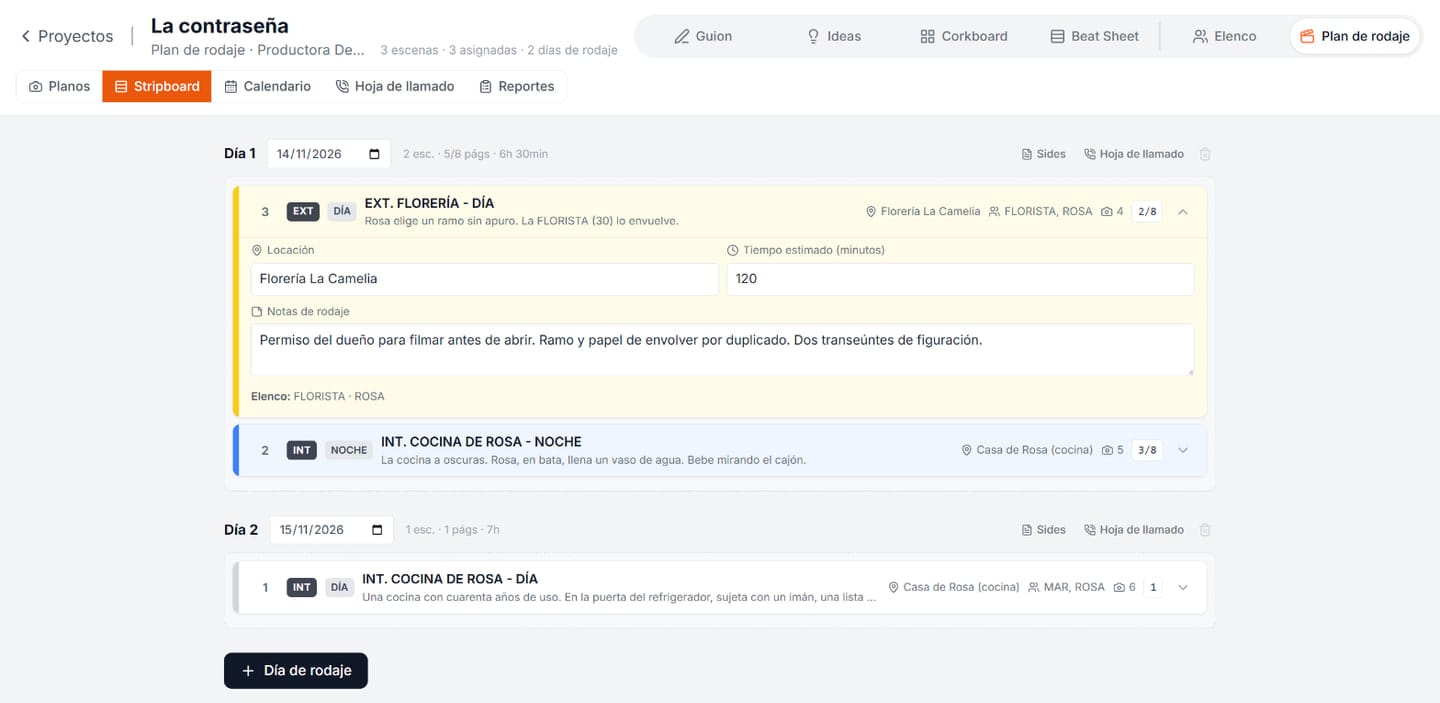
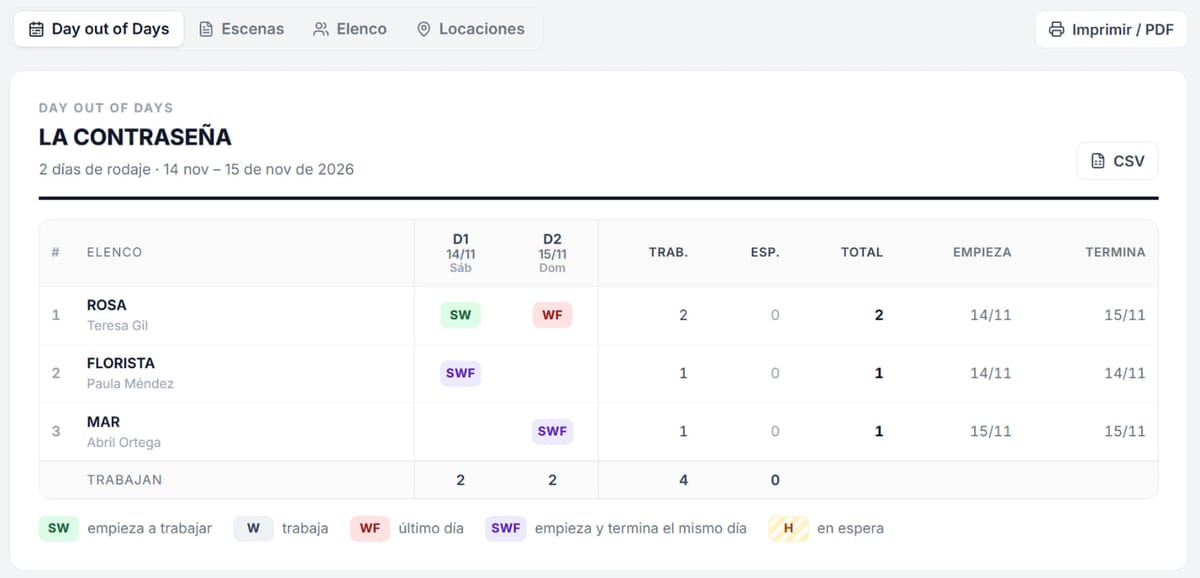
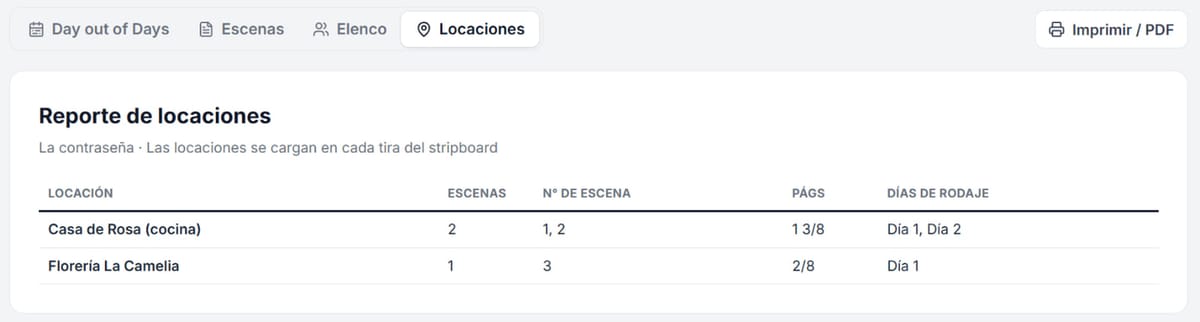
Real Scriptico screenshots with a fictional short film and production company, taken in the Spanish interface. The app is also available in English, with the same tools and the same layout.
COMPARISON
Plenty of schedules live in a spreadsheet, and for a short that can be enough. The difference is what you have to maintain by hand when the script changes.
| Scriptico | Spreadsheet | |
|---|---|---|
| The scenes | Come from the script, with eighths and cast | Typed in by hand, one per row |
| Ordering the days | Dragging strips between days | Cutting and pasting rows |
| Totals per day | Scenes, pages and estimated time, automatic | Formulas you have to maintain |
| When the script changes | The new scene appears in “Unassigned” | You have to find what changed |
| Day out of Days | Built from the schedule, with CSV | Another sheet, by hand |
| Call sheet | Built from each day | Copied into another document |
| Printing the board | No: reports and call sheets print | Yes |
A general comparison by type of tool, not of any specific product.
GETTING STARTED
Write it in Scriptico or import it from Final Draft (.fdx), Fountain, PDF or plain text.
In Shooting schedule, add your days with their dates and drag each strip where it belongs.
Download the sides, open each day's call sheet and check the cast's Day out of Days.
PRICING
Pro and Ultra include the shooting schedule, the calendar, the Day out of Days, the reports and the printable call sheet. The Production plan adds the breakdown, the digital call sheet with confirmations and the budget, for the whole team.
Pro
For screenwriters who write seriously.
US$9/month
or US$79 a year
Ultra
For teams and production companies without limits.
US$18/month
or US$159 a year
FOR PRODUCTION COMPANIES
From the locked script to the last shooting day, with the whole team working on the same version.
PRICE: US$89.00 /month. TEAM: 5 seats.
Get Production5 seats included · Notes, Reader and departments at no cost
FAQ
It's the order in which scenes are shot, day by day. It almost never matches script order: scenes are grouped by location, cast or light so the shoot takes fewer days. In Scriptico each scene is a strip, and you build the schedule by dragging strips into shooting days.
Pro and up (US$9 a month or US$79 a year), with the shooting schedule, calendar, Day out of Days, reports, cast list and printable call sheet. Ultra (US$18 a month) adds unlimited scripts and guests. The free plan doesn't include production tools.
Yes: if you haven't used it yet, Pro has a free 7-day trial with all of Pro's production tools. You start it with a card and can cancel before it ends.
New scenes appear in “Unassigned” and deleted ones leave the schedule; everything else stays on its day. Each scene is identified by its heading: if you change it (say, from DAY to NIGHT), it counts as a new scene and goes back to “Unassigned”. Lock your headings before you schedule.
From the number of lines in each scene in industry format. It's an estimate, not an exact measurement of the printed page, and it's meant for comparing days and balancing the load.
The stripboard and the calendar can't be printed or exported. The scene, cast and location reports, the Day out of Days and each day's call sheet do print (or save as PDF), and the Day out of Days exports to CSV.
Yes. The schedule saves itself and everyone with access to the script sees it. Pro lets you invite up to 5 people per script; Ultra, unlimited. Read-only members can see the schedule but not change it.
No. Scriptico doesn't sort strips for you or handle actor and location availability: you decide the order and the app adds up pages, time and cast per day. For a feature with heavy logistics, a dedicated scheduling program may serve you better.
FADE IN:
Create a free account and try Pro for 7 days with your own script.