Break down as you read
Each scene's sheet has the script right beside it. Select “tarp” or “1980s sedan”, pick the department, and it's underlined in that department's color.
SCRIPT BREAKDOWN
Select a word in the script, pick the department, and it lands on that scene's breakdown sheet and everywhere else in the shoot. AI can draft a first pass of the whole script, and a person reviews it before it counts.
WHAT IT SOLVES
Each scene's sheet has the script right beside it. Select “tarp” or “1980s sedan”, pick the department, and it's underlined in that department's color.
Extras, props, wardrobe, hair and makeup, set dressing, vehicles, animals, special and visual effects, stunts, sound and music, and special equipment. Cast comes straight from the speaking characters.
“Break down with AI” reads the scenes and suggests what each department needs. It leaves what you already tagged alone, flags new items with an orange dot and never marks a scene as broken down. Up to 600 scenes a month.
The Elements view lists each element with its scenes: rename it, move it to another department or remove it from every scene at once. The Summary shows what each scene needs.
With their position set on the team, the costume designer or the production designer tag only their own categories even with read-only access, and they don't take a seat.
Tagged elements show up on the stripboard, in the call sheet's elements of the day, in the Day out of Days by department and in the budget.
WHAT IT LOOKS LIKE
On the left, the scenes and their progress; in the middle, the scene's script with every element underlined in its department's color; on the right, the sheet with pages, shooting day and location.
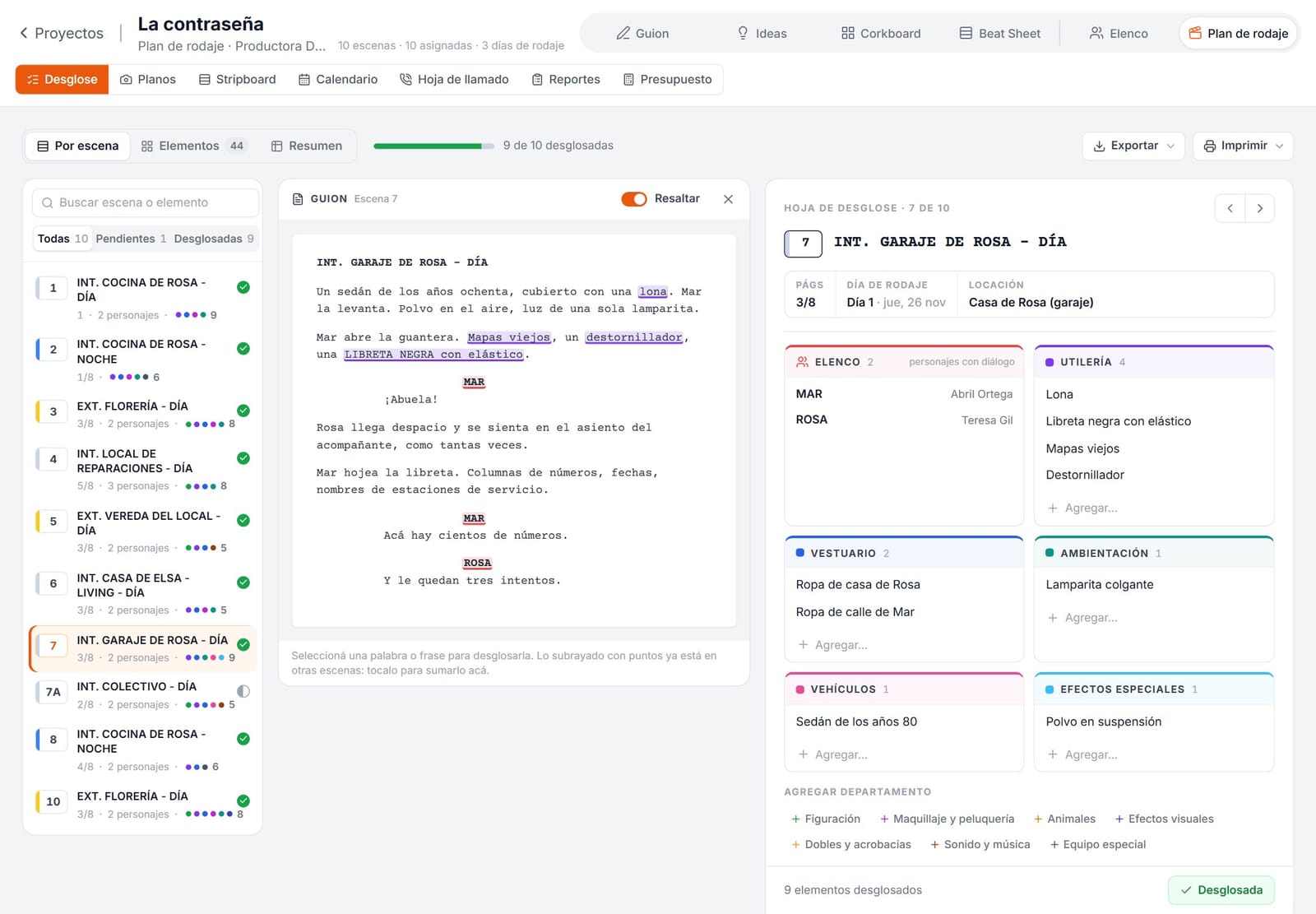
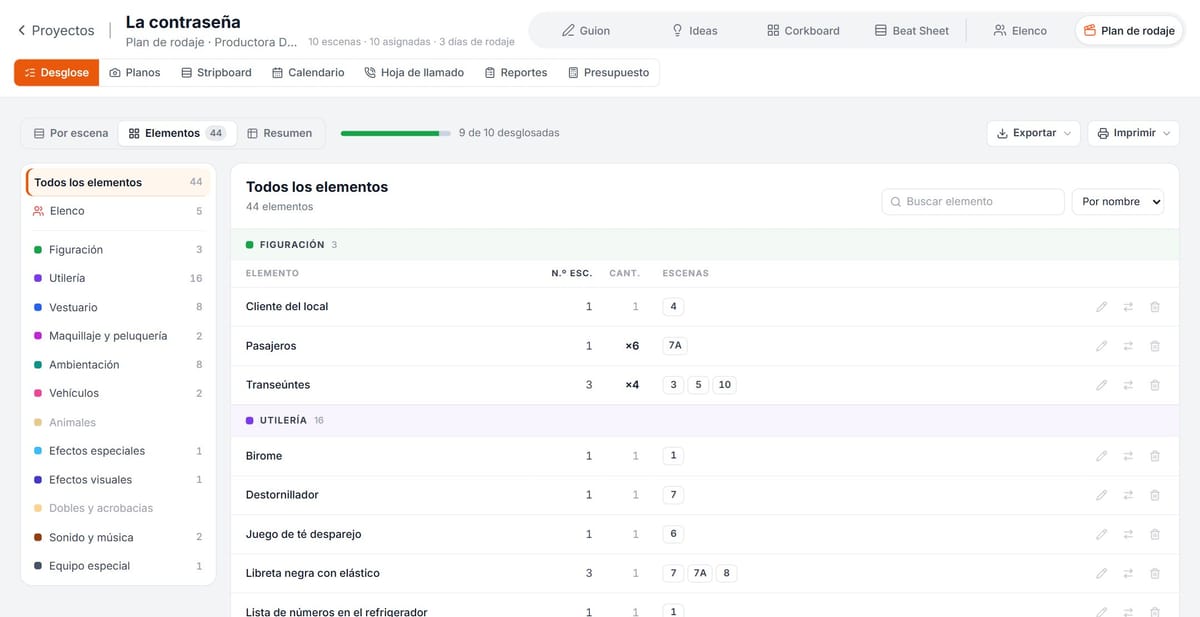
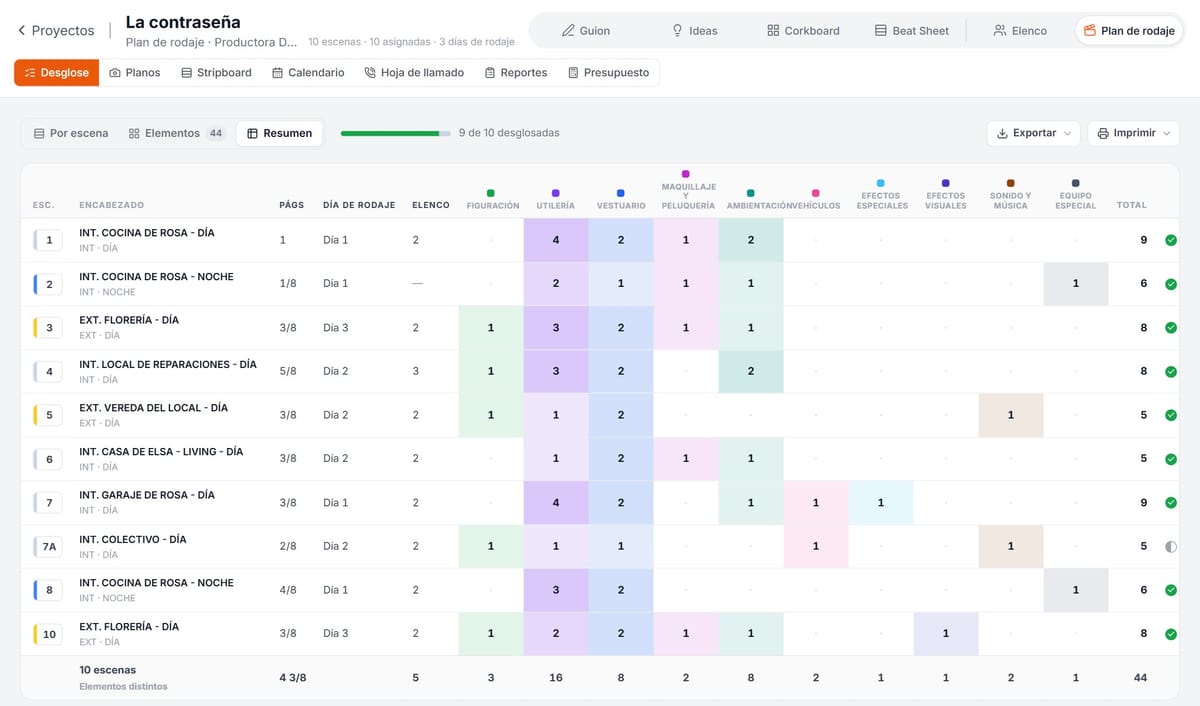
Real Scriptico screenshots with a fictional short film and production company, taken in the Spanish interface. The app is also available in English, with the same tools and the same layout.
COMPARISON
You can break down a script in a spreadsheet or with highlighters on a printed copy. The difference shows when the script changes, or when the breakdown has to reach the rest of the shoot.
| Scriptico | Spreadsheet | Printed script and highlighters | |
|---|---|---|---|
| Starting point | The script: the scenes are already there | One row per scene, typed by hand | The script on paper |
| Tagging an element | Select the text and pick the department | Typing in each department's column | One highlighter color per department |
| New scenes | Show up in the breakdown on their own | Added by hand | Mark up the new pages again |
| First pass | AI suggests, a person reviews (600 scenes a month) | By hand | By hand |
| Lists by department | Elements view, CSV and print | Filters or pivot tables | Retyped from the pages |
| Feeds the schedule and call sheet | Yes, nothing to copy | Copy and paste | No |
A general comparison by type of tool, not of any specific product. Scriptico's breakdown exports CSV, which opens in any spreadsheet.
GETTING STARTED
Write it in Scriptico or import it: Final Draft (.fdx), Fountain, PDF or plain text.
In Shooting schedule → Breakdown, “Break down with AI” suggests the elements of every scene. Or start from scratch by selecting text.
Go scene by scene, mark each one as broken down, then export the CSV or print the sheets for each department.
PRICING
US$89 a month or US$789 a year, with 5 seats included. It includes everything in Ultra and adds the AI breakdown, the digital call sheet, the budget, secure sends and production revisions.
FOR PRODUCTION COMPANIES
From the locked script to the last shooting day, with the whole team working on the same version.
PRICE: US$89.00 /month. TEAM: 5 seats.
Get Production5 seats included · Notes, Reader and departments at no cost
Only need the shooting schedule and a printable call sheet for now? They're on Pro, from US$9 a month. Shooting schedule software
FAQ
It's the list of everything each scene needs to be shot, sorted by department: which props appear, what wardrobe, which vehicles, what effects, how many extras. The shooting schedule, the call sheets and the budget are built from it. In Scriptico, every scene has its own breakdown sheet with the script beside it.
The Production plan: US$89 a month or US$789 a year, with 5 seats included. People who write take a seat (owner, admins and editors); people who only read, comment or fill in their department don't. The shooting schedule, the printable call sheet and the Day out of Days are already on Pro (US$9 a month).
You choose whether the AI breaks down the scenes that have nothing tagged yet or the whole script (in that case it only adds what's missing). The AI (Claude, by Anthropic) reads each scene and suggests elements for every department, in the script's language and reusing the names you already chose. It doesn't touch what's tagged, flags new items with an orange dot and doesn't mark any scene as broken down. You can stop it and undo it. The allowance is 600 scenes a month per account.
To build the suggestions, the text of the scenes is sent to Anthropic, Scriptico's AI provider. That only happens when someone taps “Break down with AI”: what you tag by hand doesn't go through any AI provider.
To Excel, yes, through CSV: one file by scene and one of elements, which open in Excel, Google Sheets or LibreOffice. To Movie Magic, no: Scriptico doesn't export that format. You can also print one scene's sheet (to fill in by hand), every sheet, the elements by department or the summary.
People who write the script can tag everything. Department heads, with their position set on the team, tag only their own categories even with read-only access, and they don't take a seat. Each of them sees their own work, scene by scene and day by day, in “My work”.
New scenes appear in the breakdown ready to tag, and deleted ones drop out. Tagged elements follow each scene by its heading: if you change a heading, Scriptico treats it as a new scene, so lock your headings before you break down. With production numbering locked, the breakdown shows the fixed scene numbers (12A).
The free 7-day trial is for Pro, which includes the shooting schedule, the printable call sheet and the Day out of Days, but not the breakdown. The Production plan has no free trial: if you'd like to see it with your team before buying, write to us through the plan's form.
FADE IN:
Create a free account, bring your script and move to the Production plan when you're ready to break it down with your team.