It builds itself
Day N of M, date, general call, location with directions, director, producer and phone number, the day's scenes and the cast called, all from the shooting schedule.
CALL SHEET SOFTWARE
Every day of the schedule has its own sheet: general crew call, location, scenes with their pages and cast with their call times and Day out of Days codes. Print it from Pro; on the Production plan, email it and see who confirmed.
WHAT IT SOLVES
Day N of M, date, general call, location with directions, director, producer and phone number, the day's scenes and the cast called, all from the shooting schedule.
Number, character, actor, Day out of Days code, call time and scenes. Day notes and safety notices go underneath.
Once the address is pinned on the map, the sheet shows sunrise and sunset and, about nine days out, the weather forecast.
A PDF of the day's scenes in shooting order, each with its script number, behind a cover page with the day.
On the Production plan, everyone in the cast and crew gets their call time by email with a link of their own, opens it on their phone without an account and confirms or flags a problem.
On the Production plan you send the update: the email says what changed (date, call times, location, scenes or notes) and everyone confirms again.
WHAT IT LOOKS LIKE
On the left, the sheet built from the schedule; on the right, the panel for the sent sheet: who confirmed, who only viewed it and who flagged a problem, with a button to resend to whoever's missing.
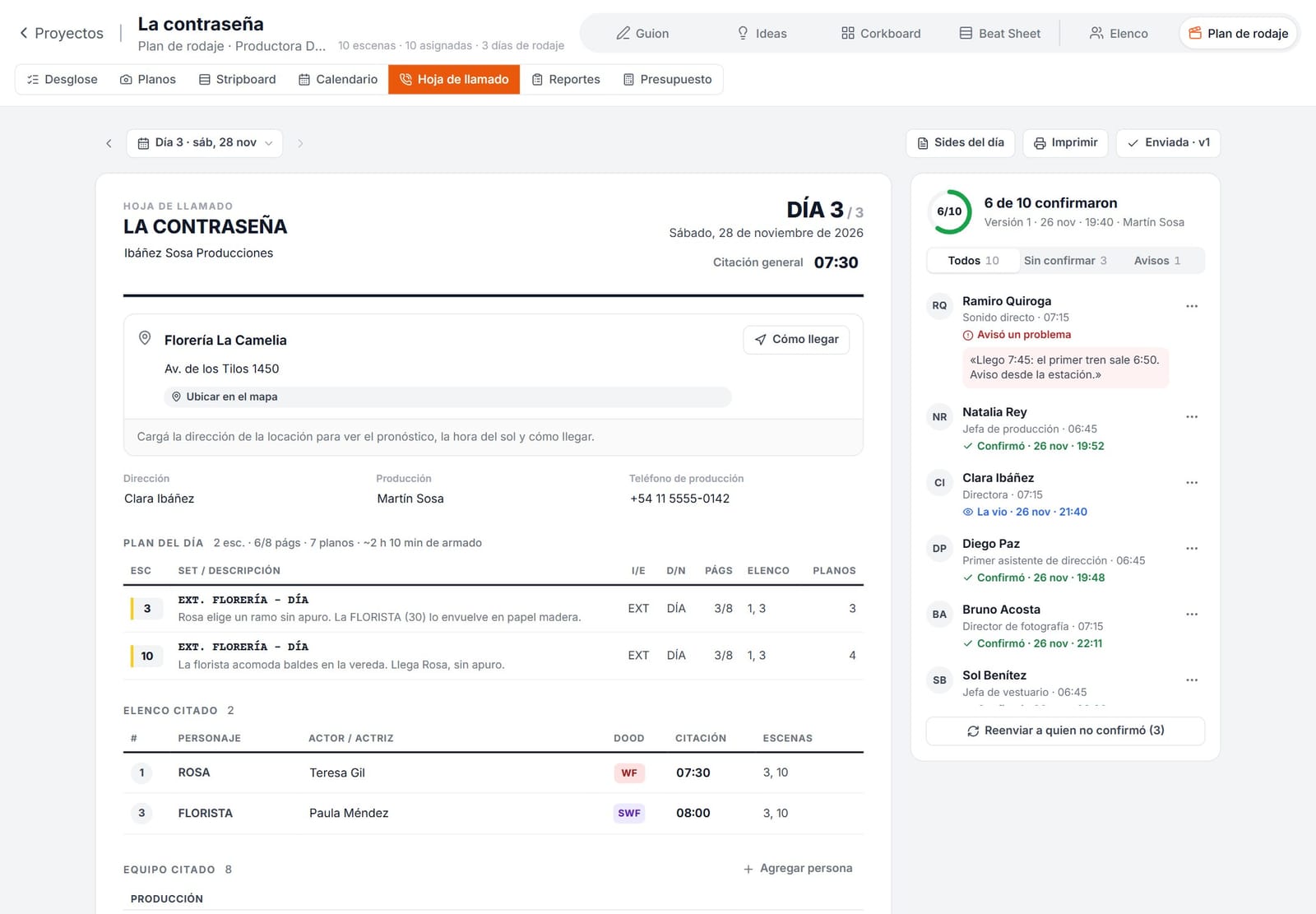
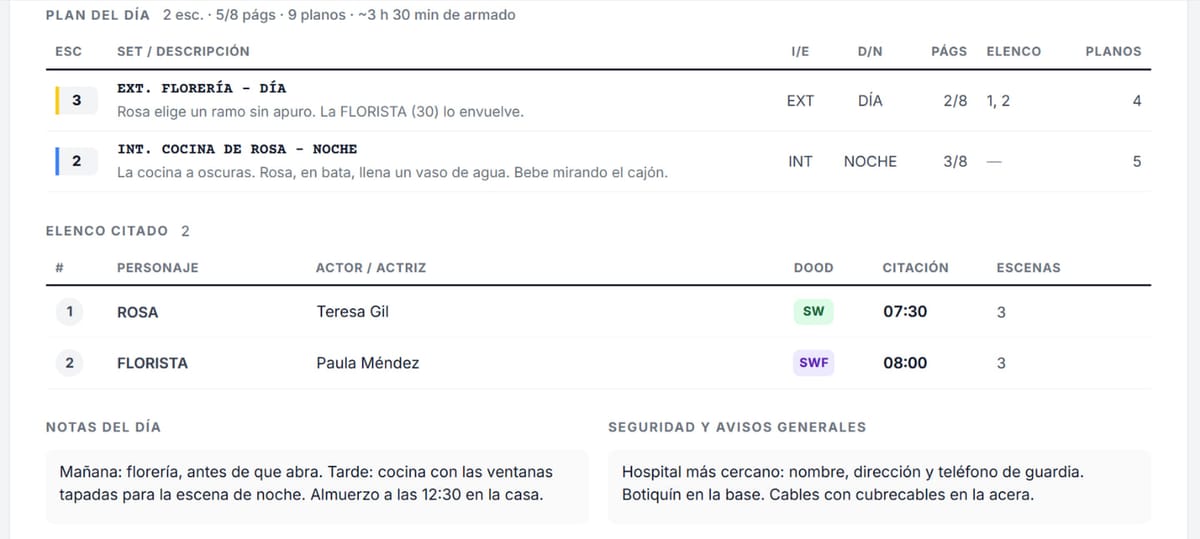
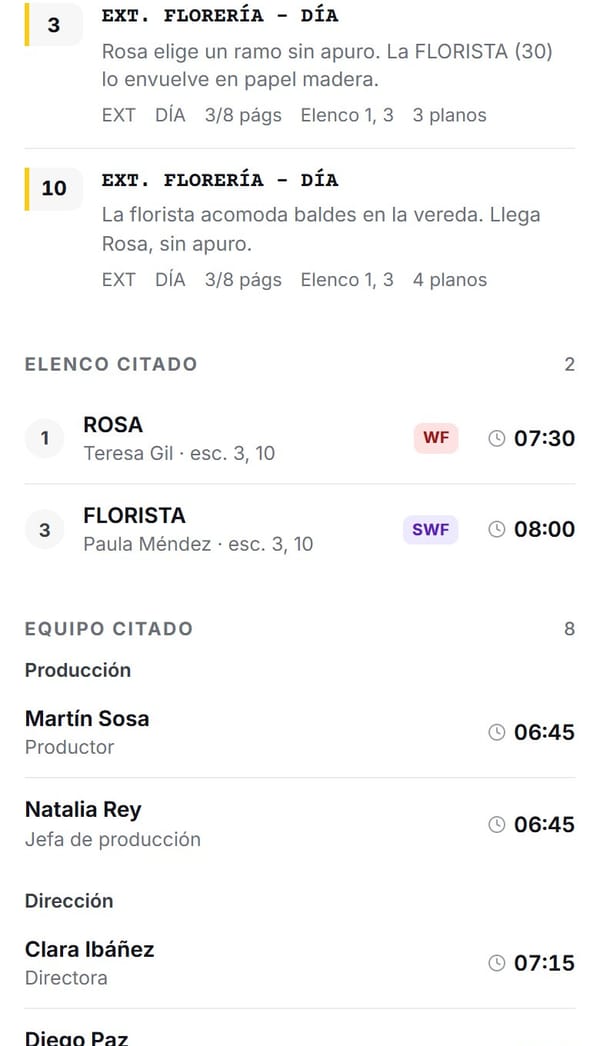
Real Scriptico screenshots with a fictional short film and production company, taken in the Spanish interface. The app is also available in English, with the same tools and the same layout.
COMPARISON
You can build a call sheet in a document or a spreadsheet and send it as a PDF. The difference shows when you have to copy the schedule over, know who read it or push a last-minute change.
| Scriptico | Document or spreadsheet as a PDF | |
|---|---|---|
| Building the sheet | Comes straight from the schedule | Copied over from the schedule, day by day |
| Weather and sunrise | On the sheet, once the address is pinned | Looked up separately |
| Sending it | By email, with a link for each person (Production plan) | As a PDF by email or messaging app |
| Knowing who read it | Sent, viewed, confirmed or flagged (Production plan) | Asking one by one |
| When something changes | A new version goes out and everyone reconfirms (Production plan) | Redo it and resend it to everyone |
| The day's sides | A PDF of the day's scenes, from Pro | Put together separately |
A general comparison by type of tool, not of any specific product. The printable sheet and the sides are on Pro; email sending and confirmations are on the Production plan.
GETTING STARTED
Put each day's scenes on the shooting schedule and add the location and call times.
Check call times, notes and safety notices, then print it or save it as PDF.
On the Production plan, pick who gets it, add a message and the sides if you like, and follow the confirmations in the panel.
PRICING
Pro and Ultra include each day's call sheet, the sides and the shooting schedule. The Production plan adds email sending with confirmations, the crew call, the elements of the day and the breakdown.
Pro
For screenwriters who write seriously.
US$9/month
or US$79 a year
Ultra
For teams and production companies without limits.
US$18/month
or US$159 a year
FOR PRODUCTION COMPANIES
From the locked script to the last shooting day, with the whole team working on the same version.
PRICE: US$89.00 /month. TEAM: 5 seats.
Get Production5 seats included · Notes, Reader and departments at no cost
FAQ
It's the document the whole cast and crew get before each shooting day: when and where each person reports, which scenes are shot and what's needed. In Scriptico, every day on the shooting schedule has its own.
The printable call sheet is on Pro and up (US$9 a month), along with the shooting schedule and the day's sides. Email sending with confirmations, the crew call and the elements of the day are on the Production plan: US$89 a month or US$789 a year, with 5 seats included.
On the Production plan, each person gets an email with their call time and a personal link. They open it on their phone without an account and see their call time, the full sheet and buttons to confirm attendance, flag a problem, add the day to their calendar, get directions (Waze too), call production and download the day's sides with their name on every page, if you included them.
Not automatically: it goes out by email. What you can do is copy each person's personal link and paste it into a message; they can confirm from there too.
The sheet tells you there are unsent changes and you send the update: the email says what changed (date, call times, location, scenes or notes) and everyone confirms again. If someone opens an old link, the sheet tells them there's a newer version.
A PDF of the scenes shot that day, in shooting order, each with its script number, behind a cover page with the day. You download them from the shooting schedule or the call sheet (Pro). On the Production plan, the sides each person downloads from their link carry their name on every page.
No: in Scriptico you don't fill in a blank template, the sheet is built from the schedule and you finish it inside the app. When it's ready, print it or save it as PDF from your browser.
The printable sheet, yes: if you haven't used it yet, Pro has a free 7-day trial with the shooting schedule and call sheets. Email sending with confirmations is on the Production plan, which has no free trial.
FADE IN:
Create a free account, build the schedule from your script and try Pro for 7 days.